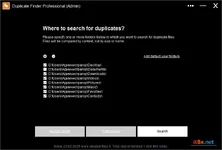
Duplicate File Finder is a powerful, lightweight utility designed to solve one of the most common digital headaches: wasted disk space. Whether you are a photographer with thousands of nearly identical shots or a casual user wondering why your "System" folder is ballooning in size, this app provides a surgical way to find and remove clones. Updated for 2026, it features an ultra-fast scanning engine that can analyze your entire hard drive in seconds, ensuring your PC runs leaner and faster.
Deep Content Analysis with MD5 Hashing
Unlike basic cleaners that only look at filenames or dates, Duplicate File Finder utilizes the MD5 Hashing Algorithm. This means the app analyzes the actual binary content of every file. If two photos are identical, the app will find them even if they have completely different names (e.g., "IMG_001.jpg" vs "Vacation_Copy.jpg"). This byte-by-byte comparison guarantees 100% accuracy, so you never have to worry about false positives.Intelligent Workspace & Grouping
Managing thousands of duplicates can be overwhelming, which is why the interface is built for scannability and control:- Smart Filtering: Automatically split duplicates into "Large," "Medium," and "Small" groups to prioritize the biggest space-savers first.
- Built-in Preview: Review each file using the default system viewer or Notepad before hitting delete.
- Explorer Integration: Right-click any file to open its exact location in Windows Explorer for further manual inspection.
- Session Memory: The app remembers your scan results between sessions, allowing you to clean up at your own pace without re-scanning.
Reclaim Gigabytes from Windows System Folders
Did you know that Windows Update and system services can create duplicates for nearly 23% of your system files? On a typical Windows 10 or 11 machine, this can waste over 1 Gigabyte of precious SSD space. Duplicate File Finder safely identifies these redundant files. While the app allows you to delete files directly to the Recycle Bin for easy restoration, it provides the transparency needed to clean even the most cluttered system directories.Key Feature Highlights
- Ultra-Fast Scanning: Deeply analyze any folder or drive in just a few seconds.
- MD5 Content Matching: Identifies duplicates by content, ignoring deceptive filenames.
- Video & Image Specialist: Highly optimized for media-heavy folders and galleries.
- Recycle Bin Safety: All deletions are sent to the bin first, ensuring no accidental data loss.
- Resource Efficient: Low CPU usage, making it perfect for background cleaning on laptops.
- Comprehensive Search: Scan standard user folders or specify custom paths and external drives.
- Persistent Results: Save time by accessing previous scan data instantly.
Duplicate File Finder: Giải Pháp Tìm Và Xóa Ảnh, Video Trùng Lặp Siêu Tốc
Duplicate File Finder là công cụ đắc lực giúp bạn giải phóng dung lượng ổ cứng bằng cách loại bỏ các tệp tin trùng lặp một cách chính xác tuyệt đối. Sử dụng thuật toán băm MD5, phần mềm không chỉ nhìn vào tên tệp mà còn so sánh nội dung bên trong, đảm bảo tìm ra mọi bản sao dù chúng đã được đổi tên. Với giao diện trực quan và tốc độ xử lý chỉ tính bằng giây, đây là phần mềm không thể thiếu để dọn dẹp máy tính Windows trong năm 2026.Tính Năng Nổi Bật
- So Sánh Nội Dung (MD5): Tìm kiếm chính xác các tệp trùng lặp dựa trên dữ liệu gốc, bất kể tên tệp có giống nhau hay không.
- Tốc Độ Quét Thần Tốc: Phân tích sâu toàn bộ thư mục chỉ trong vài giây, tiết kiệm thời gian tối đa cho người dùng.
- Phân Nhóm Thông Minh: Tự động chia các tệp trùng lặp thành các nhóm tệp Lớn, Trung bình và Nhỏ để bạn dễ dàng ưu tiên xử lý.
- Xem Trước Trước Khi Xóa: Cho phép mở tệp hoặc xem vị trí trong Windows Explorer để đảm bảo bạn không xóa nhầm dữ liệu quan trọng.
- An Toàn Tuyệt Đối: Tệp bị xóa sẽ được đưa vào Thùng rác (Recycle Bin), cho phép khôi phục lại bất cứ lúc nào nếu cần.
- Ghi Nhớ Kết Quả: Lưu lại kết quả quét giữa các phiên làm việc, giúp bạn tiếp tục dọn dẹp mà không cần phải quét lại từ đầu.
- Dọn Dẹp Hệ Thống: Phát hiện và loại bỏ các tệp thừa do Windows Update tạo ra, giải phóng hàng Gigabyte dung lượng lãng phí.
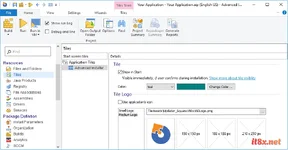
Advanced Installer Architect
23.5.0
PowerISO
9.3
🗂️ Tệp đính kèm