UEStudio: The Ultimate Developer’s Text Editor with Deep Git Integration
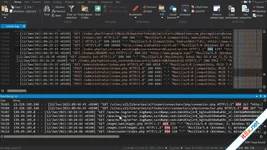
UEStudio is built upon the foundation of the world’s best text editor, UltraEdit, and delivers powerful additional features for teams and developers. By combining high-performance text editing with native Git management, UEStudio streamlines your entire development workflow within a single application.Powerful Native Git Integration
- All-in-One Git Editor: Eliminate the need for separate Git management tools. Clone, checkout, update, commit, and push/pull directly from within the editor using simple hotkeys or mouse clicks.
- Merge & Conflict Resolution: Easily merge branches via the built-in Git branch manager. When conflicts arise, use the integrated UltraCompare mergetool to review and resolve them instantly.
- Live Markdown Preview: Markdown is essential for Git repositories. UEStudio provides a live preview for Markdown and HTML, allowing you to double-check README.md formatting without opening a browser.
- Version Comparison: Compare your current uncommitted changes to the HEAD version, or compare files against previous versions and different branches using the specialized Git version compare.
- Native Difftool/Mergetool: For developers who prefer the command line, UltraCompare integrates natively as a Git difftool and mergetool, launching the GUI only when you need it for complex visual comparisons.
Intelligent Coding Features
- Smart Code Completion: UEStudio parses your project and source files to provide intelligent, automatic code completion.
- Contextual Hints: View function tips, class data members, and function parameters via helpful on-screen hints as you type.
- Smart Templates: Speed up your coding process by using customizable templates for frequently used code structures.
- Project Review: Quickly see exactly what has changed in your working directory since the last commit by comparing working copies with indexed versions.
Why Choose UEStudio?
UEStudio is designed for those who need more than just a text editor. It bridges the gap between an IDE and a lightweight editor, giving you the power to manage complex repositories while maintaining the legendary speed of UltraEdit. Whether you are merging branches or writing complex functions, UEStudio provides the professional tools required for modern software development.Pro Tip: Use the integrated Git Shell within UEStudio to execute advanced commands while keeping your source code visible in the main editor window for a truly seamless experience.
Download: Direct

Video Downloader Ultimate
1.0.1.243
MyLanViewer Enterprise
6.7.5
Sửa bởi :