WinNc is a professional, tabbed file manager that breathes new life into the classic dual-pane "Norton Commander" philosophy. Built for the speed and aesthetic of Windows 11 and 10, it offers a robust alternative to the standard File Explorer. With a focus on project-based organization and high-speed file operations, WinNc is the ideal command center for power users who manage large datasets across local, network, and cloud storage.
Dual-Pane Efficiency and Project Organization
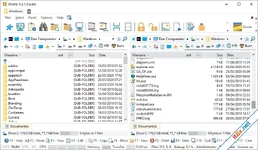
The heart of WinNc is its dual-panel interface, which allows you to view two directories side-by-side for instant drag-and-drop actions. Taking productivity further, WinNc introduces the "Projects" feature—virtual tabs that allow you to group related files and folders from different parts of your disk into a single workspace without moving the actual files. This project-centric approach, combined with a modern flat interface, makes managing complex workflows significantly faster.Logical Color-Coding and Parallel Tasking
WinNc provides instant visual feedback for every action. It uses Logical Colors to identify active tasks: Green for copying, Orange for moving, and Yellow for packing archives. Unlike standard Windows transfers, WinNc supports Parallel Tasks, allowing you to run multiple copy or move jobs simultaneously rather than waiting for one to finish. If performance is a priority, you can easily configure the maximum number of concurrent tasks to suit your hardware.Multimedia Power and Advanced Utilities
WinNc is more than just a file mover; it is a complete toolkit:- Integrated Media Player: Quickly browse through content with a built-in video player, audio player, and image slideshow viewer.
- Disc & ISO Tools: Burn files directly to DVD/CD, create ISO images, and verify data integrity.
- Audio Converter: Convert audio files between popular formats directly within the manager.
- Archive Master: Full support for ZIP, 7z, and TAR, including the creation of self-extracting (.exe) archives and encrypted files.
- File Synchronization: Keep folders on different drives or network locations perfectly mirrored with the built-in sync tool.
Quick Access and Intelligent Search
Navigation is optimized through the Quick Access system. By pressing the spacebar, you can instantly search for and jump to any folder you've worked in recently. WinNc ranks results by relevance, so your most-used folders like 'Downloads' or 'ProjectX' are always a keystroke away. You can also "star" frequent locations as favorites and add custom tags to folders to make searching even more precise.Key Feature Highlights
- Norton Commander Clone: The classic dual-pane layout updated for Windows 11.
- Parallel Operations: Set concurrent task limits to maximize file transfer speed.
- Project Tabs: Create virtual links to related files spread across your PC.
- Color-Coded Status: Instant visual recognition of copy/move/zip actions.
- High-DPI Support: Crisp interface scaling for 4K and 8K monitors.
- FTP/SFTP Support: Seamlessly manage remote server files like local data.
- Quick Access & Tags: Advanced bookmarking and search ranking for folders.
WinNc: Trình Quản Lý Tệp Dual-Pane Đỉnh Cao Cho Windows 11
WinNc là bản nâng cấp hiện đại của huyền thoại Norton Commander, mang đến giao diện hai bảng (dual-pane) cực kỳ tiện lợi cho người dùng Windows 11 và 10. Với triết lý tập trung vào hiệu suất, WinNc giúp bạn xử lý hàng ngàn tệp tin cùng lúc thông qua hệ thống tab và các tính năng tự động hóa như đồng bộ hóa, nén file và chuyển đổi định dạng đa phương tiện. Đây là công cụ thay thế hoàn hảo cho Windows Explorer truyền thống trong năm 2026.Tính Năng Nổi Bật
- Giao Diện Hai Bảng (Dual-Pane): Giúp việc sao chép và di chuyển dữ liệu giữa các thư mục trở nên trực quan và nhanh chóng hơn bao giờ hết.
- Quản Lý Theo Dự Án (Projects): Tạo các tab ảo chứa các tệp liên quan đến một dự án cụ thể mà không cần di chuyển tệp gốc.
- Xử Lý Đa Nhiệm Song Song: Cho phép thực hiện nhiều lệnh sao chép, di chuyển cùng lúc để tận dụng tối đa sức mạnh phần cứng.
- Mã Màu Thông Minh: Nhận diện ngay lập tức trạng thái tệp: Xanh lá (đang sao chép), Cam (đang di chuyển), Vàng (đang nén).
- Trình Xem Đa Phương Tiện Tích Hợp: Xem ảnh, video và nghe nhạc trực tiếp ngay trong ứng dụng mà không cần phần mềm bên thứ ba.
- Công Cụ Archive Mạnh Mẽ: Hỗ trợ ZIP, 7z, TAR và cho phép tạo file tự giải nén (.exe) có mật khẩu bảo vệ.
- Quick Access Thần Tốc: Nhấn phím Space để truy cập nhanh các thư mục thường dùng dựa trên lịch sử làm việc.
 Download: app.box.com
DriverMax Pro
17.11.0.12

InnoExtractor 2026
11.5.0.171 Ultra