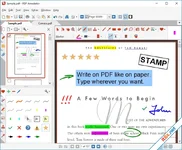
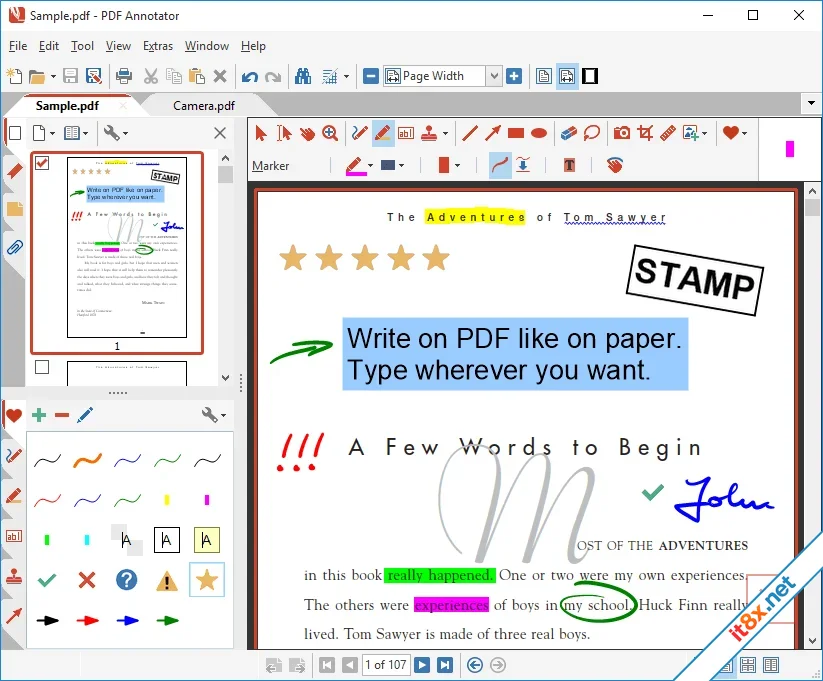
PDF Annotator is a powerful tool that allows you to open any PDF file and add comments, corrections, and signatures directly on the document pages. Whether you are using a mouse or a Tablet PC pen, you can annotate files in a natural, intuitive way. Once edited, documents are saved directly back to the PDF format, ensuring they can be read, printed, or emailed by anyone without the need for specialized software.
 Download: app.box.com
Streamlined Review and Proofreading
Gone are the days of printing documents just to add manual comments or using multiple software products for simple feedback. PDF Annotator simplifies the entire review process into a single step. For professionals and students, it provides a digital-first approach to proofreading, allowing you to highlight text, draw diagrams, or handwrite notes while keeping everything in a clean, digital format that is easy to archive and share.Advanced Annotation Management
Managing your feedback is effortless with the integrated Annotation Manager in the sidebar. This feature provides a quick overview of every comment in your document, allowing you to navigate to specific edits instantly. You can also perform bulk operations on selections of annotations, such as changing colors or deleting specific types, making it an essential tool for handling long, complex technical documents or academic papers.Intelligent Filtering and Reporting
To help you focus on what matters, PDF Annotator includes a sophisticated filtering system. You can narrow down your view by type, color, or page number to see only the annotations you need. Additionally, the software can generate "Annotation Overviews"—detailed lists with small previews of every edit—which can be printed separately to provide a clear summary of changes without printing the entire multi-page document.Key Feature Highlights
- Natural Handwriting: Use a stylus or pen to write directly on PDFs as if they were paper.
- Annotation Manager: Quickly locate, organize, and edit all comments from a single sidebar.
- Smart Filters: Sort annotations by color, type, or author to streamline your review.
- Print Overviews: Generate summary reports of all changes for quick reference.
- One-Step Workflow: Open, annotate, and save back to PDF without converting files.
- Image Integration: Easily drop stamps, signatures, or photos onto any PDF page.
PDF Annotator: Giải Pháp Ghi Chú Và Chỉnh Sửa PDF Chuyên Nghiệp
PDF Annotator cho phép bạn mở bất kỳ tệp PDF nào và thêm ghi chú, nhận xét hoặc chữ ký trực tiếp lên trang văn bản bằng chuột hoặc bút cảm ứng. Sau khi chỉnh sửa, bạn có thể lưu trực tiếp về định dạng PDF để gửi email hoặc in ấn mà không làm thay đổi cấu trúc tệp gốc. Đây là công cụ hoàn hảo để thay thế việc in ấn giấy tờ chỉ để ký tên hoặc sửa lỗi thủ công.Tính Năng Nổi Bật
- Ghi Chú Tự Nhiên: Viết, vẽ và đánh dấu trực tiếp lên tệp PDF bằng bút cảm ứng, mang lại cảm giác như đang thao tác trên giấy thật.
- Quản Lý Ghi Chú Thông Minh: Thanh sidebar giúp bạn xem nhanh toàn bộ danh sách các nhận xét và di chuyển đến vị trí cần sửa trong nháy mắt.
- Bộ Lọc Nâng Cao: Dễ dàng lọc các ghi chú theo loại, màu sắc hoặc số trang để tập trung vào những nội dung quan trọng nhất.
- Báo Cáo Tổng Hợp: Hỗ trợ in danh sách tổng hợp các thay đổi kèm hình ảnh xem trước, cực kỳ hữu ích cho việc kiểm soát nội dung bản thảo.
- Chỉnh Sửa Đa Năng: Chèn thêm hình ảnh, con dấu, hoặc tạo các trang trắng để ghi chú thêm vào giữa tệp PDF hiện có.
- Tiết Kiệm Thời Gian: Loại bỏ quy trình in-sửa-quét (scan) phức tạp, giúp hoàn thành công việc hoàn toàn trên môi trường kỹ thuật số.
Download: app.box.com-
- Từ khóa
- chỉnh sửa pdf pdf
Coolutils Total Excel Converter
7.1.0.111
Coolutils Total Doc Converter
5.1.0.378/150
Sửa lần cuối: